
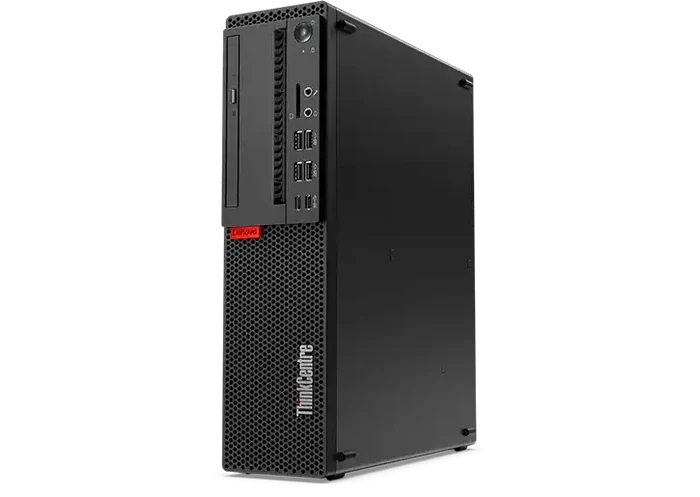
Buying a computer does not always mean purchasing a brand-new device. For home users, students, professionals, and businesses, used desktop computers can provide excellent performance at a more affordable price. With the right specifications and condition, a pre-owned desktop can handle everyday tasks such as browsing, office work, video streaming, communication, accounting, and even more demanding workloads.
Choosing a quality used computer also allows buyers to get better specifications for their budget. Instead of spending more on a new entry-level system, you may be able to find a previously owned desktop with a faster processor, more RAM, greater storage, and better connectivity.
Why Choose Used Desktop Computers?
The biggest advantage of buying used desktop computers is value. Businesses and individuals often replace computers even when the devices still have plenty of useful life remaining.
A carefully inspected used desktop can offer reliable performance without the higher price of a brand-new machine.
Some key benefits include:
- Lower purchase cost: Used systems are generally more affordable than new models.
- Better specifications for your budget: You may get a stronger processor or additional RAM for the same amount of money.
- Wide selection: Different brands, configurations, sizes, and specifications are available.
- Suitable for everyday computing: Many used desktops are more than capable of handling office and home tasks.
- Reduced electronic waste: Reusing existing technology can help extend its useful lifespan.
- Business-friendly purchasing: Companies can equip multiple workstations while keeping technology expenses under control.
However, condition matters. Buyers should look for sellers that inspect, test, clean, and accurately describe their computers before sale.
Refurbished Computer Bundles for Complete Workstations
For buyers who need more than just a desktop tower, refurbished computer bundles can be a convenient option. A bundle may combine a desktop computer with accessories such as a monitor, keyboard, and mouse, making it easier to create a complete workstation.
This can be especially useful for small businesses, students, home offices, and people setting up additional workstations.
When comparing refurbished computer bundles, consider:
- Processor generation and performance
- RAM capacity
- SSD or hard-drive storage
- Operating system compatibility
- Monitor size and resolution
- Available USB and video ports
- Keyboard and mouse condition
- Warranty or return policies
A bundle can also simplify the purchasing process because you do not have to source every component separately. Instead, you can choose a compatible set designed to work together.
Refurbished Dell Monitors for Sale: Complete Your Setup
A good monitor is an important part of any desktop workstation. Buyers searching for refurbished dell monitors for sale can find practical display solutions without necessarily paying the price of a brand-new monitor.
Dell monitors are commonly used in offices, home workstations, educational environments, and business settings because they are available in a variety of sizes and configurations.
When selecting a refurbished monitor, pay attention to:
- Screen size
- Resolution
- Display ports
- HDMI, DisplayPort, or VGA connectivity
- Adjustable stand features
- Screen condition
- Brightness and image quality
- Compatibility with your desktop
It is also important to make sure the monitor has the correct ports for your computer. A monitor with excellent specifications may not be useful if it cannot connect easily to your chosen desktop without additional adapters.
A quality refurbished monitor can be a smart way to expand your workstation while keeping overall costs manageable.
Wireless Keyboard and Mouse Combo for a Clutter-Free Desk
A desktop setup is not complete without the right input devices. A wireless keyboard and mouse combo can help create a cleaner and more organized workspace by reducing the number of cables around your desk.
Wireless accessories are particularly useful for home offices, compact desks, classrooms, and flexible workstations.
When choosing a wireless keyboard and mouse combo, consider:
- Wireless connection type
- Battery life
- Keyboard layout
- Mouse comfort and size
- Compatibility with your operating system
- USB receiver requirements
- Ergonomic design
- Build quality
A wireless setup can also make it easier to reposition your keyboard, mouse, and monitor according to your preferred working position.
What to Check Before Buying a Used Desktop
Not every used computer will provide the same level of performance or reliability. Before purchasing, take some time to evaluate the specifications and physical condition.
1. Check the Processor
The processor has a major impact on overall performance. Look at the processor model and generation rather than focusing only on the brand.
For everyday activities such as email, web browsing, documents, and basic business applications, a modern entry-level or mid-range processor may be sufficient.
2. Look at RAM
RAM affects how smoothly your computer can handle multiple applications.
For many everyday users, 8GB of RAM can provide a reasonable starting point, while 16GB or more may be preferable for multitasking and heavier workloads.
3. Choose the Right Storage
An SSD generally provides faster startup and application loading compared with a traditional hard disk drive.
When comparing used desktops, consider both:
- Storage capacity
- Storage type
A smaller SSD may provide a faster experience than a larger traditional hard drive, although your ideal choice depends on how much data you need to store.
4. Inspect Physical Condition
Check the desktop for visible signs of damage, excessive dust, broken ports, or other issues. A professional refurbishment process should normally include cleaning, testing, and inspection.
5. Verify Connectivity
Make sure the desktop includes the ports you need for your monitor, keyboard, mouse, printer, networking equipment, and other peripherals.
Used vs. New Desktop Computers: Which Is Better?
The right choice depends on your budget and requirements. A new computer provides the latest hardware and typically comes with a manufacturer’s warranty. However, it may cost considerably more for comparable specifications.
Used desktop computers can be particularly attractive when:
- You have a limited technology budget.
- You need multiple computers for a business.
- You want a secondary home or office workstation.
- Your computing requirements are relatively straightforward.
- You want to maximize specifications within a fixed budget.
The key is to purchase from a reputable seller that clearly explains the condition and specifications of each device.
Who Can Benefit From Used Desktop Computers?
Used desktops can work well for a wide range of users. They are particularly suitable for:
Students: Great for research, assignments, online learning, and productivity applications.
Home users: Suitable for browsing, email, streaming, personal documents, and everyday computing.
Small businesses: An affordable option when setting up multiple employee workstations.
Remote workers: Useful for creating a dedicated home-office setup.
Organizations: Businesses and institutions can potentially reduce technology costs by purchasing quality pre-owned systems.
How to Get Better Value From Your Purchase
Before making a decision, determine what you actually need from the computer. Avoid paying extra for specifications that you will never use.
Start by identifying:
- Your primary applications.
- Required RAM and storage.
- Preferred screen size.
- Required connectivity.
- Available desk space.
- Your overall budget.
- Whether you need a complete workstation bundle.
It is also worth comparing the total cost of a complete setup rather than looking at the desktop price alone. A lower-priced tower may become more expensive once you purchase a monitor, keyboard, mouse, and other accessories separately.
Used desktop computers can be an excellent choice for anyone looking for practical computing performance without the cost of buying brand-new hardware. With careful attention to specifications, condition, storage, RAM, processor performance, connectivity, and seller reliability, you can find a system that fits your needs and budget.
Whether you need a standalone desktop, refurbished computer bundles, refurbished Dell monitors for sale, or a wireless keyboard and mouse combo, choosing quality refurbished technology can make setting up an affordable workstation much easier.
For dependable options and a wide selection of pre-owned technology, explore Tech Trade Group and find a desktop setup that delivers the features you need at a price that works for your budget.